Fabric or Mohist
Fabric is a lightweight mod loader, available very quickly for each new Minecraft version. Most Fabric mods also need the Fabric API mod, which is installed on the server like the others.
Mohist is a hybrid server that loads both Forge mods and Bukkit plugins. It does not follow the latest Minecraft versions (see the table), and some mods and plugins conflict with each other. Test your combination before opening the server.
Forge, NeoForge and Quilt cannot be installed from the panel for now. A recent NeoForge modpack, such as All the Mods 10, therefore cannot be hosted as is.
Installing mods
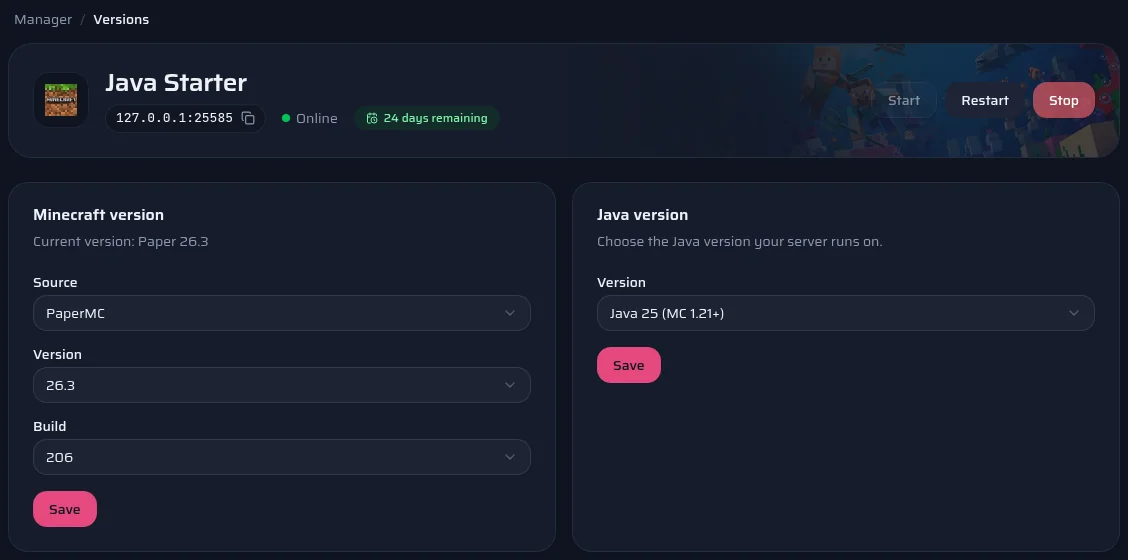
- Install Fabric or Mohist at the version you want from the Versions page.
- Open the Marketplace page and search for the mod.
- Pick a version. The panel only offers those declared compatible with your Minecraft version and your loader.
- The file goes into the mods folder. Restart the server to load it.
Your players must install the same content mods (blocks, items, creatures) in their game. A mod that only works on the server side, such as Lithium for performance, does not need to be on their side.
Official documentation: Modrinth
Hosting a modpack
- Note the pack's Minecraft version and loader.
- Install that loader at that version from the Versions page: Fabric, or Mohist for a Forge pack on a version it supports.
- If the author publishes server files, use them first and upload their contents over SFTP. Otherwise, read the pack's installation instructions first, then upload your instance's mods and config folders, without the mods meant only for the game, such as Sodium or Iris.
- Start the server and read the console: a missing or duplicate mod is named there.
The panel does not install a modpack in one click yet, hence these steps to do once. Some packs also need scripts or configuration files of their own on the server: the author's instructions come first.
Official documentation: Modrinth
The right Java version
Each Minecraft version needs a minimum Java version: Java 25 for the 26 versions, Java 21 since 1.20.5, Java 17 from 1.18 to 1.20.4. Forge mods for 1.12.2 and older versions need Java 8.
You choose Java 8, 11, 17, 21 or 25 on the server's Versions page, then restart.