Minecraft Java

Minecraft Fabric server hosting

Rent your Minecraft Fabric server, installed in one click at the version you choose. Modrinth mods and modpacks are installed from the panel, no FTP client needed.

Fabric, a lightweight mod loader

Fabric is a light, open source mod loader. It comes out very quickly for each new Minecraft version, often on release day.

Most Fabric mods need the Fabric API mod. It is installed on the server like the others, from the Marketplace.

Fabric does not load Bukkit or Paper plugins. For plugins, stay on Paper; for the big content mods and modpacks such as All the Mods, choose NeoForge.

Official documentation: Fabric

Switch your server to Fabric

  1. Open your server's Versions page.
  2. Pick Fabric, the Minecraft version, then the loader version: the newest one almost always fits.
  3. Save. The server stops, Fabric is installed, then the server starts again if it was running.

A world made by Paper does not open with Fabric. If nobody has played it yet, the panel replaces it without asking. Otherwise it offers to start a new world and keeps the old one in a separate folder: you get it back by returning to Paper.
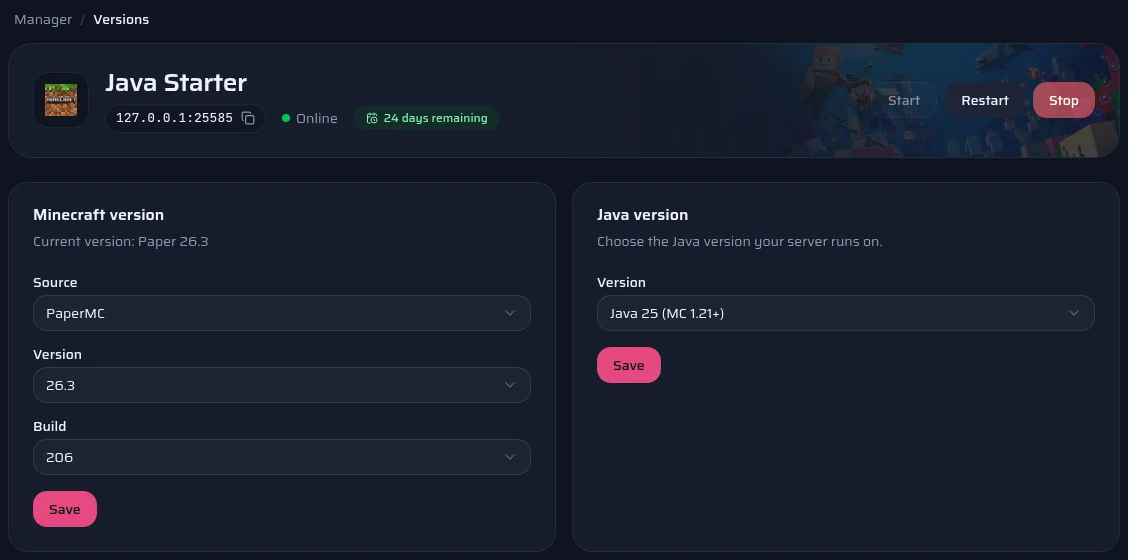
The panel's Versions page: server software, version, build and Java version.

Install mods

  1. Open your server's Marketplace page, Mods tab.
  2. Search for the mod, for example Lithium for performance or Waystones to travel.
  3. Pick a version. The panel only offers those declared compatible with your Minecraft version and Fabric.
  4. The file goes into the mods folder. Restart the server to load it.

Your players must install the same content mods (blocks, items, creatures). A mod that only works on the server side, such as Lithium, does not need to be on their side.

Official documentation: Modrinth

A Fabric modpack in one click

  1. Open the Marketplace page, Modpacks tab, and search for the pack.
  2. Pick its version. The panel shows the number of mods and the advised RAM.
  3. Start the install. The server stops, a backup is made, then the mods, the configuration and the right Fabric are installed.
  4. The server starts again by itself at the end.

Your world is kept, unless you choose to start a new world: the old one then stays in the backup. Only Modrinth's Fabric modpacks install in one click for now.

Official documentation: Modrinth

Which plan for your Fabric server?

The same plans as on the Minecraft Java page, with the same panel. You can change plan later.

  1. A few mods

    Performance or comfort mods, a small group

    Suggested: Java Plus

    4 GB of RAM · €5.00 / month

    Order
  2. Modded server

    Several dozen content mods

    Suggested: Java Pro

    8 GB of RAM · €7.50 / month

    Order
  3. Big modpack

    More than 150 mods

    Suggested: Java Extreme

    16 GB of RAM · €15.00 / month

    Order

These suggestions are a guide: what you install matters as much as the player count. You can switch plans later.

Compare all Minecraft Java plans

Frequently asked questions

Do you have any questions or specific needs? Contact Us

Yes: Fabric and every mod that adds content, at the same versions. The easiest way is to give them the same modpack, installed with a launcher such as Modrinth App or Prism Launcher. Server-only mods are not needed on their side.

Most often a dependency is missing: Fabric API, or a library a mod asks for. The console names the missing mod. Install it from the Marketplace, then restart. If the console reports a mod made for another Minecraft version, replace it with the right version.

No, Fabric does not load Bukkit, Spigot or Paper plugins. Many plugins have a Fabric mod counterpart on Modrinth. If your plugins are essential, stay on Paper.

Not as it is: a world made by Paper does not open with Fabric. The panel offers to start a new world and keeps the old one in a separate folder. The other way round works: Paper imports a Fabric world by itself, but the blocks and items added by mods are lost.

Not from the panel. Most Quilt mods also exist for Fabric: look for their Fabric version in the Marketplace.

See also